BYD dashcam: record with your car's own cameras
Your BYD already has four surround cameras. Yoldaş records with them from the DiLink multimedia screen, so you do not need to fit a separate dashcam.
Last updated: October 15, 2026
What can you do?
- When to record: Yoldaş records in short segments. You choose separately what happens while driving and while parked: while driving, Off, On hard braking or Continuous; while parked, Off, When Sentry detects or Continuous. Default: Continuous while driving, Off while parked.
- Segment length: 15 seconds (default), 1 minute or 5 minutes. A longer segment means fewer files and uninterrupted viewing; but a clip is ready only when its segment closes, and if recording is cut off (ignition, power) the whole segment is lost.
- 30-second clips: one tap saves all four camera views in a single MP4 file. The button follows the recording conditions you chose.
- Recording quality: Normal (960×720, about 10 frames per second) or High (1280×960, about 15 frames per second). "Highest quality when parked" records at the sharpest setting while parked. "Lower quality when the car heats up" (on by default) steps driving recording down one level when the car heats up and returns when it cools. Recording stops at extreme heat.
- Storage space: you choose it in steps from 512 MB to 64 GB (1 GB by default). When it fills up, the oldest recording you have not protected is deleted.
- Protection: protect any important recording; after hard braking, the 15 seconds before and after are protected automatically (adjustable from 5 to 30 seconds). The share set aside for protected clips is 30% by default (10% to 60%); when it fills up, the oldest protection is released.
- Drive groups: continuous recording segments are collected drive by drive; you watch a drive with one tap.
- Info label: while a clip plays, speed, gear, accelerator and brake pedals, turn signal, steering and battery can be drawn under the video (off by default; works on new recordings).
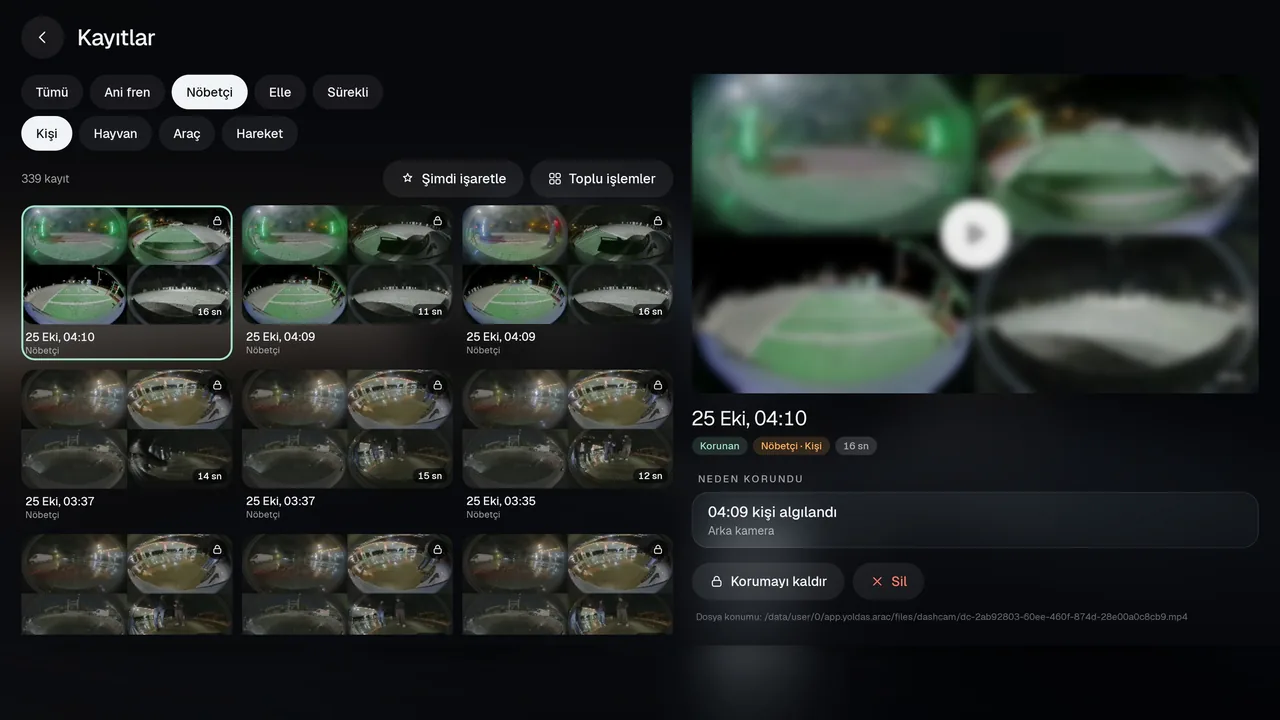
- Event tags: in the Recordings list, clips show with person, animal and vehicle tags. Hard braking and moments you mark by hand carry their own tag too; you filter the list by tag.
- Markers on the timeline: if a clip has more than one event, each one (person, animal, vehicle, motion) is marked on the timeline.
- Resilient recording: if the microphone drops, recording continues silently and the audio is turned back on; if a recording segment cannot be closed, recording does not stop.
- Recording health: each recording shows how many frames were saved and whether the file opens from start to finish.
- Playback: all four views play together, and you can zoom any camera to twice its size.
- Stays in the car: videos are stored in the car and are not uploaded to the server on their own; they are only fetched from the car when you ask on your phone.
- Send to phone: see the recording list on your phone and download the one you choose as an original or reduced-size MP4.
- Cabin audio: add sound to recordings if you want.
How to use it
- Choose your recording preferences
On the Security tab in Yoldaş, choose when to record, the quality and the storage space.
- Save a clip
Tap "Record 30 s" on the camera screen. When it finishes, the clip appears in the Recordings list.
- Protect important recordings
A protected recording is not deleted when the recording space fills up; only if the share set aside for protection fills up is the oldest protection released. On your phone, you fetch the recording you want from the car and download it.
To watch the surroundings while parked, see Sentry Mode. To see the cameras live on your phone, see live camera. If parked recording is on (Security › Recording and protection › Parked › "When Sentry detects" or "Continuous"), you can watch the video of the moment in a watch notification in Recordings.
Frequently asked questions
Can a BYD record video like a dashcam?
BYD's own software shows the surround cameras for parking and maneuvering. Yoldaş uses the same cameras to record on the road and while parked, and combines all four views into one video.
Where are recordings saved?
In the car, in Yoldaş's own folder. Recordings are not uploaded to the server on their own. You set the storage space (512 MB to 64 GB, 1 GB by default); when it fills up, the oldest recording you have not protected is deleted. On your phone, you can fetch any recording from the car and download it as an MP4.
Does it record sound too?
If you want. Cabin audio is turned on in the recording preferences and needs a separate microphone permission; it is off by default.
How do I find a specific event in my recordings?
In the Recordings list, clips show with person, animal and vehicle tags; hard braking and moments you mark by hand have their own tags. You filter the list by tag. In a clip with more than one event, each event is marked on the timeline.
Does recording stop if the microphone drops?
No. Recording continues silently and the audio is turned back on. Recording does not stop if a recording segment cannot be closed, either.
Is the recording protected after hard braking?
Yes. If "Hard braking" recording is on, when hard braking is detected the 15 seconds before and the 15 seconds after are protected automatically (adjustable from 5 to 30 seconds). The share set aside for protected clips is 30% by default (10% to 60%); when that share fills up, the oldest protection is released.
Install Yoldaş in your car
Free during the pilot. Current version 0.15.33. See the steps in the install guide.