BYD turn signal camera: side view when you signal
When you signal left or right, Yoldaş shows the view from the camera on that side. You choose the window's position, size and shape.
Last updated: October 4, 2026
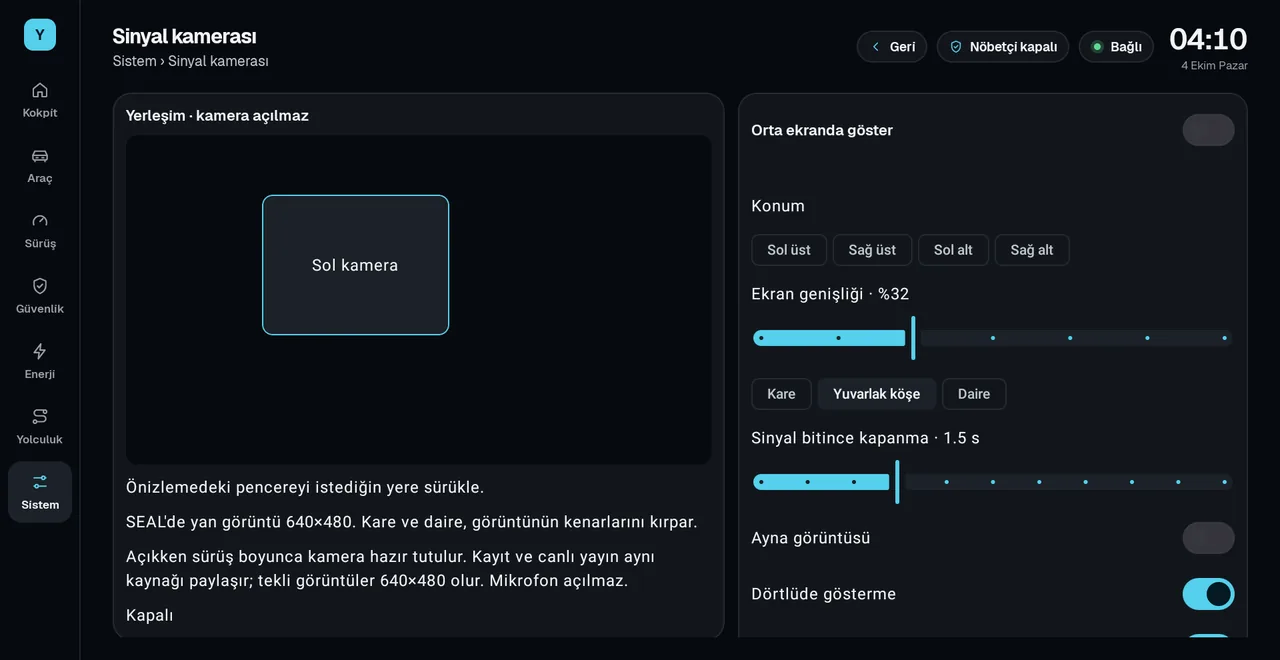
Where does it appear?
- Centre screen: the camera shows in a small window on top of whatever is open on the screen.
- Instrument cluster: on the screen behind the steering wheel, as a separate layer on top of the app or map you chose. Cluster display
- Both: the same camera shows on the center screen and on the cluster; no second camera is opened.
What can you set?
- Position: top left, top right, bottom left, bottom right. Or drag the window in the preview and drop it where you like.
- Width: from 20% to 50% of the screen.
- Shape: square, rounded corners or circle.
- Mirror image: flips the image horizontally.
- Close after signal ends: 0 to 5 seconds; the default is 1.5 seconds.
- Hide during hazards and in reverse: you can turn each off separately.
The "Layout · camera stays off" preview shows where the window will sit without opening the camera.
How to turn it on
- Turn on the turn camera
In Yoldaş, on the System › Turn camera page, choose the target: Centre screen, Instrument cluster or Both.
- Grant the permissions
Camera permission and the "display over other apps" permission are needed. For the cluster target, the Yoldaş helper must also be connected.
- Set the layout
Choose the position, width and shape. Settings apply right away.
When it is on, the camera stays ready while you drive. Recording and live view share the same source; the microphone is not turned on. Side camera mapping is set up for the BYD Seal. The turn camera is off by default.
Frequently asked questions
Does the side camera open when I signal on a BYD?
With Yoldaş, it does. When you signal left or right, the view from the camera on that side shows in a small window; when the signal ends, the window closes.
Where does the image appear?
On the center screen, on the cluster behind the steering wheel, or on both. You choose the target under System › Turn camera.
Can I move the window?
Yes. You can pick one of the four corners, or drag the window to any spot in the preview. You set the width between 20% and 50%, and the shape as square, rounded corners or circle.
Which cars does it work on?
Side camera mapping is set up for the BYD Seal.
What happens in reverse and with the hazard lights?
You can choose to hide it in both cases; both are on by default. In reverse, BYD's own parking view takes priority.
Install Yoldaş in your car
Free during the pilot. Current version 0.10.5. See the steps in the install guide.