BYD Seal
The car Yoldaş is developed on. All features: turn camera, cluster display, bottom bar and the 360° Seal view.
The Seal is BYD's electric sports sedan. We develop Yoldaş on a BYD Seal; features are tried in the car on the Seal first. Yoldaş installs on the car's BYD DiLink multimedia screen.
Last updated: November 19, 2026
You install Yoldaş on the Seal with an APK file: open the file on the car screen or install it from a computer with ADB. The steps are in the app install guide, and the latest APK is on the download page.
Yoldaş shows your car on this drawing, with tire pressures, doors and windows in the same view. On your phone and on the car screen, in the Seal's official paint colors. The official paint colors and the digital twin exist only on the Seal; a 360° view is also shown for the Seal U, Seal U DM-i, Atto 3 and Dolphin.
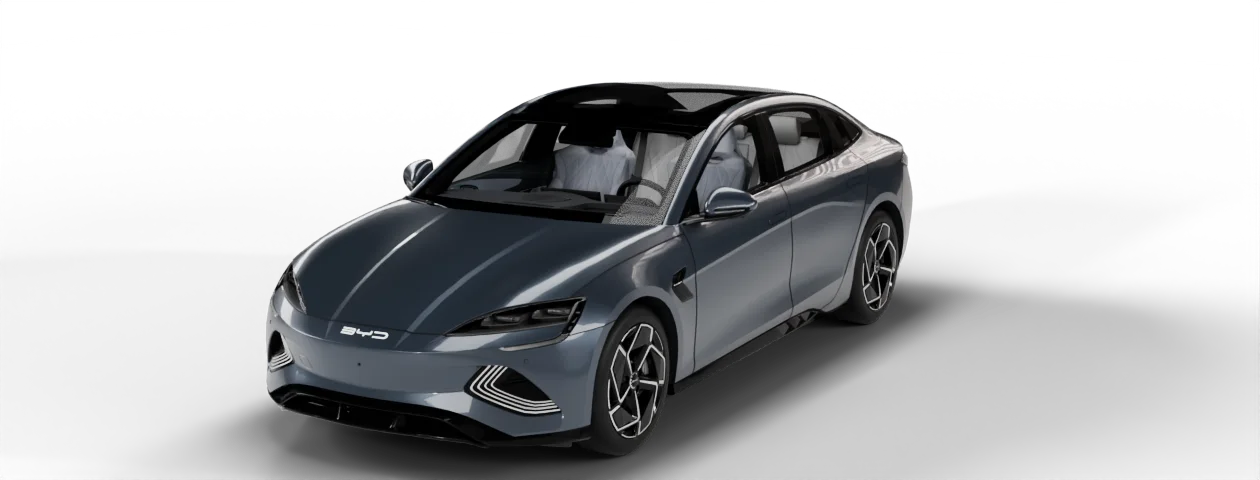
Swipe or use the arrow keys to rotate the car.
| Powertrain | Fully electric. |
|---|---|
| Multimedia platform | DiLink 3 family (Android 10). |
| Software version | Starts with 13.1.33. The version read on the Seal that Yoldaş is developed on: 13.1.33.2606100.1. |
| Center screen | 15.6-inch rotating screen. Measured resolution 1920×1080 pixels (16:9). Yoldaş's car-screen interface was designed for this screen. |
| Instrument cluster | 10.25 inches. The cluster image is 1920×720 pixels (8:3). Cluster display is available. |
| Car image | There is a 360° car drawing in the Seal's official paint colors. |
To find out how to see your software version and what the version number means, read the DiLink 3, 4 and 5 guide.
The Seal's four surround cameras appear in Yoldaş as front, rear, left and right. This mapping has been confirmed on the Seal; the same names are used in live camera, recordings, Sentry notifications and the turn camera. When Sentry Mode sees an event, the notification and the radar show which side it is on (front, rear, left, right). When you signal, the side camera on that side opens on the center screen or on the cluster.
| Feature | Status |
|---|---|
| Data read from the car | Yes. Battery, range, speed, gear, tire pressure, 12 V battery, consumption and charging. |
| Dashcam recording | Yes. Continuous recording from four cameras and 30-second instant clips; recordings stay in the car and you fetch them to your phone whenever you want. |
| Sentry Mode | Yes. The direction of the event is shown in the notification and on the radar. |
| Live camera and turn camera | Yes. You watch all four cameras live from your phone; the turn camera opens on the center screen and on the cluster. |
| Control from your phone | Yes. Windows, trunk, lock and A/C. |
| Cluster display | Yes (10.25-inch cluster). |
| 360° car drawing | Yes. |
The car Yoldaş is developed on. All features: turn camera, cluster display, bottom bar and the 360° Seal view.
Dashcam, Sentry, live camera, remote control, charging and trip tracking.
Electric and fuel side by side: total range, L/100 km, SAVE. Dashcam, Sentry and cluster display too.
Dashcam, Sentry, live camera, map on the cluster, remote control, charging and trip tracking.
Dashcam, Sentry, live camera, remote control, charging and trip tracking.
Dashcam, Sentry, live camera, remote control, charging and trip tracking.
Dashcam, Sentry, live camera, remote control, charging and trip tracking.
Dashcam, Sentry, live camera, remote control, charging and trip tracking.
Dashcam, Sentry, live camera, remote control, charging and trip tracking.
Dashcam, Sentry, live camera, remote control, charging and trip tracking.
Electric and fuel side by side: total range, L/100 km, SAVE. Dashcam and Sentry too.
Electric and fuel side by side: total range, L/100 km, SAVE. Dashcam and Sentry too.
Open the APK file on the car screen, or install it from a computer with ADB. See the steps in the app install guide.
With Yoldaş, yes. Yoldaş records with the Seal's own surround cameras while driving and parked; you do not need an extra dashcam.
Yes. A map or an app of your choice is sent to the Seal's 10.25-inch cluster. The steps are on the Cluster display page.
The four cameras are listed as front, rear, left and right. Yoldaş uses these names in live camera, recordings and Sentry events; Sentry also tells you which side the event was on.
Yes. Yoldaş's car-screen interface was designed for the Seal's 1920×1080 pixel screen. With BYD's bottom bar showing, the usable area is 1920×990 pixels, and Yoldaş fits that area.
Free during the pilot. Current version 0.15.33. See the steps in the install guide.