BYD custom bottom bar: your own shortcuts in one tap
Yoldaş can show its own bar at the bottom of the screen. Back, Home and A/C are always there; you fill the other six slots with the shortcuts you use most.
Last updated: October 4, 2026
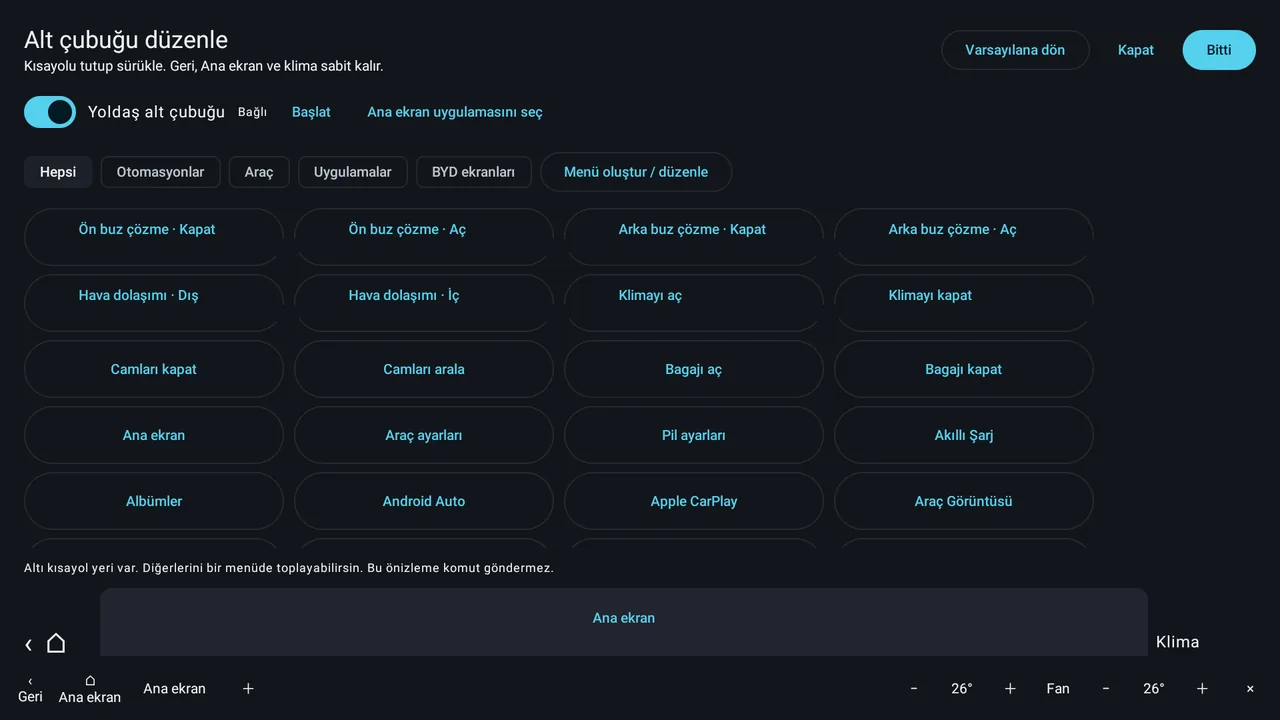
What is on the bar?
- Fixed buttons: Back, Home, − / + for driver and passenger temperature, Fan (1–7), A/C on/off, and × to go back to the BYD bar.
- Six shortcut slots: hold a shortcut and drag it to put them in order.
- Menus: group extra shortcuts in a menu. A menu holds up to 12 items.
Which shortcuts can you add?
- Vehicle: front defrost, rear defrost, inside/outside air circulation, A/C on/off, close/vent windows, open/close trunk, and driving modes (Eco, Normal, Sport, Snow).
- Automations: start a routine you built with one tap. Automations
- Apps: any app installed on the car.
- BYD screens: Yoldaş Home, vehicle settings, battery settings.
How to turn it on
- Start the Yoldaş helper
Tap "Start" on the System › Yoldaş helper page. Details
- Edit the bar
Tap the System › Yoldaş bottom bar card. Pick shortcuts, drag them into place and tap "Done".
- Turn the bar on
Turn on the "Yoldaş bottom bar" switch. "Reset" always brings back the original layout.
Choosing the Home app
With the "Choose Home app" button, you can make Yoldaş Android's Home app. The Home button on the bar opens the app you choose.
Going back to the BYD bar
While Yoldaş shows its bar, it hides BYD's own bottom bar. When the bar is closed, when the Yoldaş helper connection drops or when Yoldaş stops, the BYD bar comes back on its own. The bar only shows while the screen is on and the car is not in reverse.
Frequently asked questions
What is the bottom bar?
It is a Yoldaş bar that replaces the bar at the bottom of the BYD screen. Back and Home on the left, and driver and passenger temperature and fan on the right, stay fixed; you choose the six shortcuts in the middle.
Which shortcuts can I add?
You can add vehicle actions (defrost, air circulation, A/C, windows, trunk, driving mode), your own automations, installed apps and BYD screens (vehicle settings, battery settings).
What if six slots are not enough?
Group the other shortcuts in a menu. You name the menu, and one menu holds up to 12 shortcuts.
How do I get back to BYD's own bar?
Just tap the × button on the bar. If Yoldaş closes or the connection drops, the BYD bar comes back on its own.
Can I change the Home screen?
Yes. With "Choose Home app", you can make Yoldaş your Home app.
Install Yoldaş in your car
Free during the pilot. Current version 0.10.5. See the steps in the install guide.