BYD automations: build your own routines
In Yoldaş, turn the things you do often into an automation. You choose when it runs, under which conditions, and what it does, step by step.
Last updated: October 4, 2026
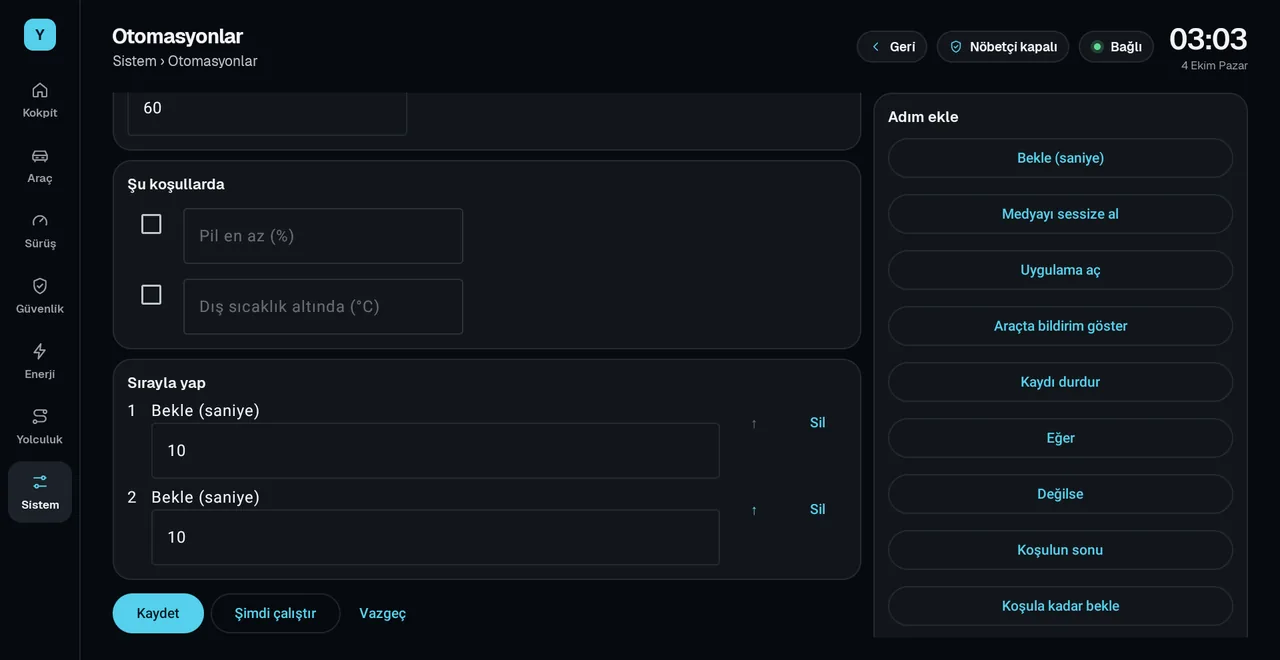
When should it run?
- On button press (from the car screen or your phone)
- When the car turns on
- At 100% battery
- At a set time, on the days you choose
Under which conditions?
- If the battery is at least a certain percentage
- If the outside temperature is below a certain value
All conditions must be met together. If the car data is out of date or a step cannot be completed, the routine stops.
Which steps are there?
- Wait: for a set time or until a condition is met.
- Mute media
- Open app
- Notify in car
- Stop recording
- If, Otherwise, End condition: different steps depending on a condition; nested up to three levels deep.
How to set one up
- Open the Automations screen
In Yoldaş, go to System › Automations.
- Pick a template or create a new one
"Mute media", "Stop recording" and "At 100% battery" are ready-made templates.
- Save and try it
Tap "Run now" to try the routine right away; the screen shows which step it is on.
For running it from your phone and for other commands, see the remote control page.
Frequently asked questions
What is an automation?
A series of steps that runs on its own at a certain moment. For example, when the car turns on, it can mute media and open an app, or it can show a notification on the car screen when the battery reaches 100%.
Can I run an automation from my phone?
Yes. You can start and stop the automations in your car from your phone.
How many steps can I add?
An automation can have up to 20 steps, and a routine can run for up to 2 hours in total. Conditions can be nested up to three levels deep.
Install Yoldaş in your car
Free during the pilot. Current version 0.10.2. See the steps in the install guide.